Dumping e-Reader cards
March 8, 2026 at 4:42 PM (UTC)
I discovered something really cool while prepping for the 4-e demo that I'm planning to do at the office this week, and it has totally derailed me from prepping for said demo.
It turns out, an issue buried in a project to make an open-source cartridge reader has a reference to a piece of Game Boy Advance homebrew I didn't know existed.
It's called "Flash Dumper v6", and it dumps e-Reader cards. It's just kinda hanging out at the other end of an obscure MediaFire link. Here's a copy I repacked into a ZIP.
(I would love to know its provenance, by the way; all I can see is that it's based on CaitSith2's MBV2 card dumper and was created by someone called "Pikachu025". Contact me if you know or can find out more.)
So here's what I did.
Injecting the tool
I started out by resetting the e-Reader's save. Plugged it into the GBA, turn it on, quickly start holding A, B, L and R simultaneously. Confirmed. Shut the GBA off again.
I grabbed my GB Operator and plugged in my e-Reader. Went to "Data", "Backup Save", and wrote the save.
A note here. I frequently get this message:
Save data integrity check failed!
The save data appears to be inconsistent between read cycles. Please clean the cartridge pins and try again.
It is indeed dumping slightly variant save files, every time… but only in the regions from 0x0ff80 to 0x0ffff, and their mirror at 0x1ff80 to 0x1ffff. I don't think this is dirty pins (though I cleaned them anyway.) I should try this again with a different method and see what I get, but for now I'm just proceeding.
With "e-Reader (USA).sav" in hand, I created this script, "inject-dumper":
#!/bin/sh

if [ -z "$2" ]; then
        echo usage: "$(basename "$0")" SAVEFILE INJECT >&2
        exit 1
fi

dd if="$1" bs=4k count=16
dd if="$2" bs=4k count=1
dd if="$1" bs=4k skip=17
And ran it:
./inject-dumper \
    "e-Reader (USA).sav" \
    e-reader-us-save-inject-flash-dumper-v6.sav \
    >"e-Reader (USA) with Flash Dumper.sav"
This puts the injection at 0x10000 in the e-Reader's Flash and makes a new save file.
I dumped the e-Reader ROM itself and ran it with the new save in mGBA to check all that was well, then used the Operator to flash it back to the e-Reader.
Dumping a card
Booting up the e-Reader again, there's now a "Flash Dumper v6" program in the saved data. Running that gives me a screen of little "x" symbols. I xmoved to one of these, hit A to scan a card, which turns it into an "o" on completion.
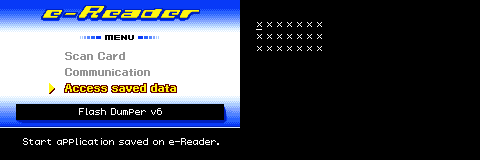
Once done, I put the e-Reader back into the Operator again and backed up the save one more time.
Now it's time for one other thing from the Flash Dumper distribution: "erdump". erdump is an .exe (lol) and a C program. I read, then compiled the C program:
cc -o erdump erdump.cFed it my save file with the card dumps:
./erdump "e-Reader (USA) with card dumps.sav"This created some new files alongside the save file. Only one, in this case since I just tested my Super Mario Advance 4 Wild Ride in the Sky card.
.raw files are the dot codes as seen by the e-Reader camera. I could check the integrity at this point against No-Intro's database entry for this card:
crc32 "e-Reader (USA) with card dumps.sav_1.raw" It matched! Interestingly, I don't know if .raw files might actually not match at this point, but still be fine—I think they have error-correction data, which means some bit errors might still get me to my goal, a .bin file.
The tool I need is CaitSith2's NEDC Enc. I've built those tools locally, but I also found this website which does it right in my browser!
.bin file in hand, I headed back to 4-e…
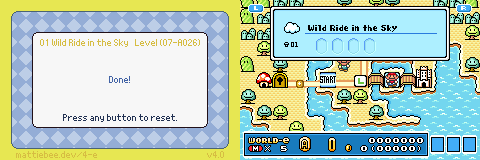
It worked!
This is so cool. I haven't actually been able to dump cards up until this point, but now my entire US card collection (Series 1 and 2 of Mario, plus a handful of NES games, and this weird little Kirby slide puzzle card I have promoting the "Fox Box" kids' show block) can now be scanned in.