Fix Fastmail sending on macOS Mail
February 21, 2026 at 2:54 PM (UTC)
When you set up Fastmail on macOS Mail (colloquially known as "Mail.app"), you can go two ways:
-
Download a configuration profile.
-
Manually configure IMAP and SMTP.
I go the second route because it lets me then edit my list of email addresses. I maintain [counting] four now that all go to the same place, so this is important for not confusing some senders.
On one Mac, though, this wasn't working out quite right. No matter what I did, no matter how many app passwords I generated or times I checked the settings, it refused to authenticate to send mail.
Turned out something was broken in Mail's "automatic management" of that SMTP connection.
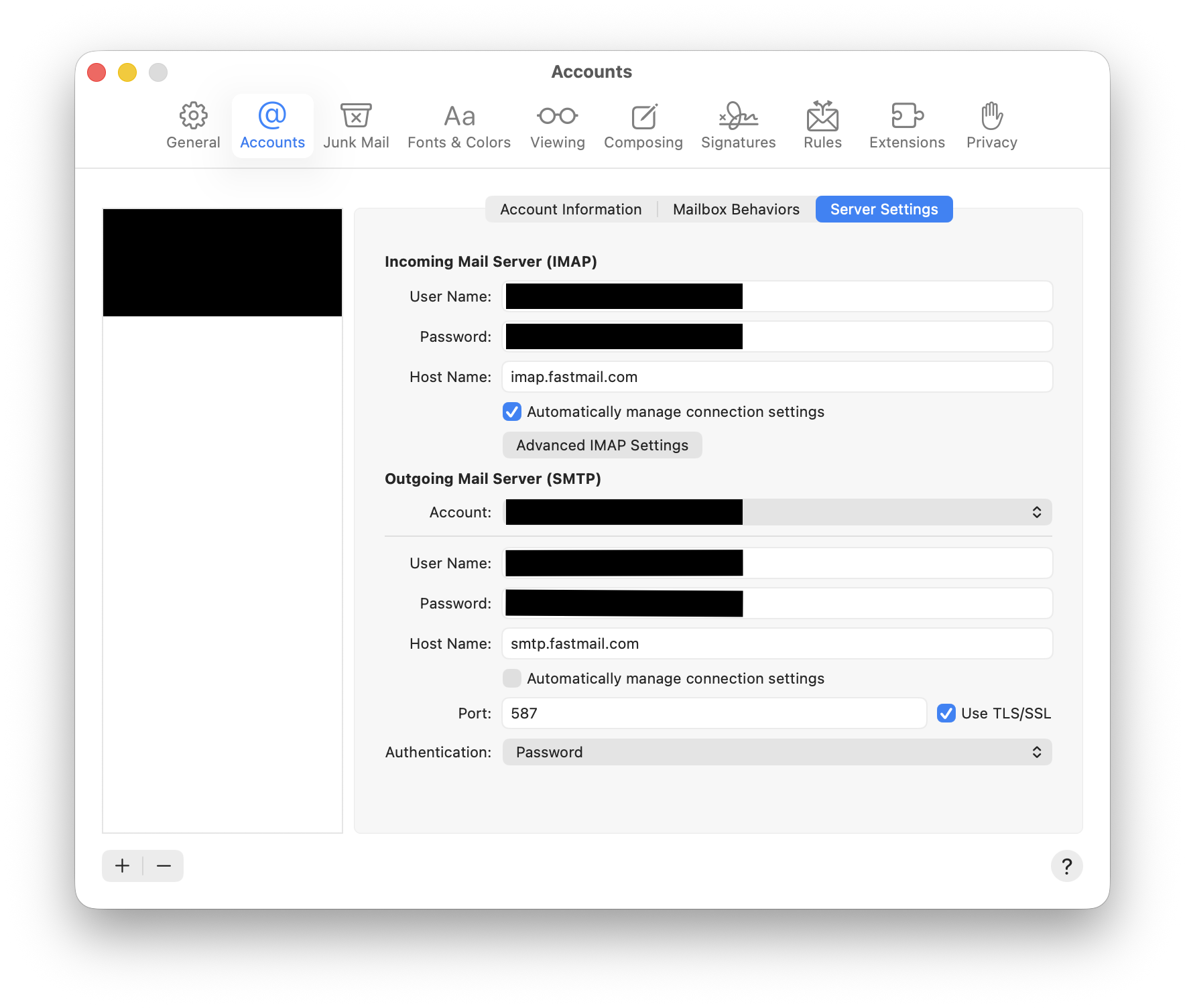
The trick:
- command+, to to get to Settings.
- Accounts tab.
- Select the troublesome account.
- Server Settings sub-tab.
- Uncheck "Automatically manage connection settings".
- Set "Authentication" to password.
- Make sure "Use TLS/SSL" is on so you don't send the password in plaintext over the Internet.
I figured this out after I noticed the Connection Doctor was claiming SMTP didn't need a login, which was clearly false.
Weirdly, seems I can turn that setting off again now. I guess once it saw once that it needed a password, it's fine?
I might just be old, but it seems software and services have been breaking in more and more annoying ways lately. I'm not here for it.